Figma plugin
A senior design review, before every review.
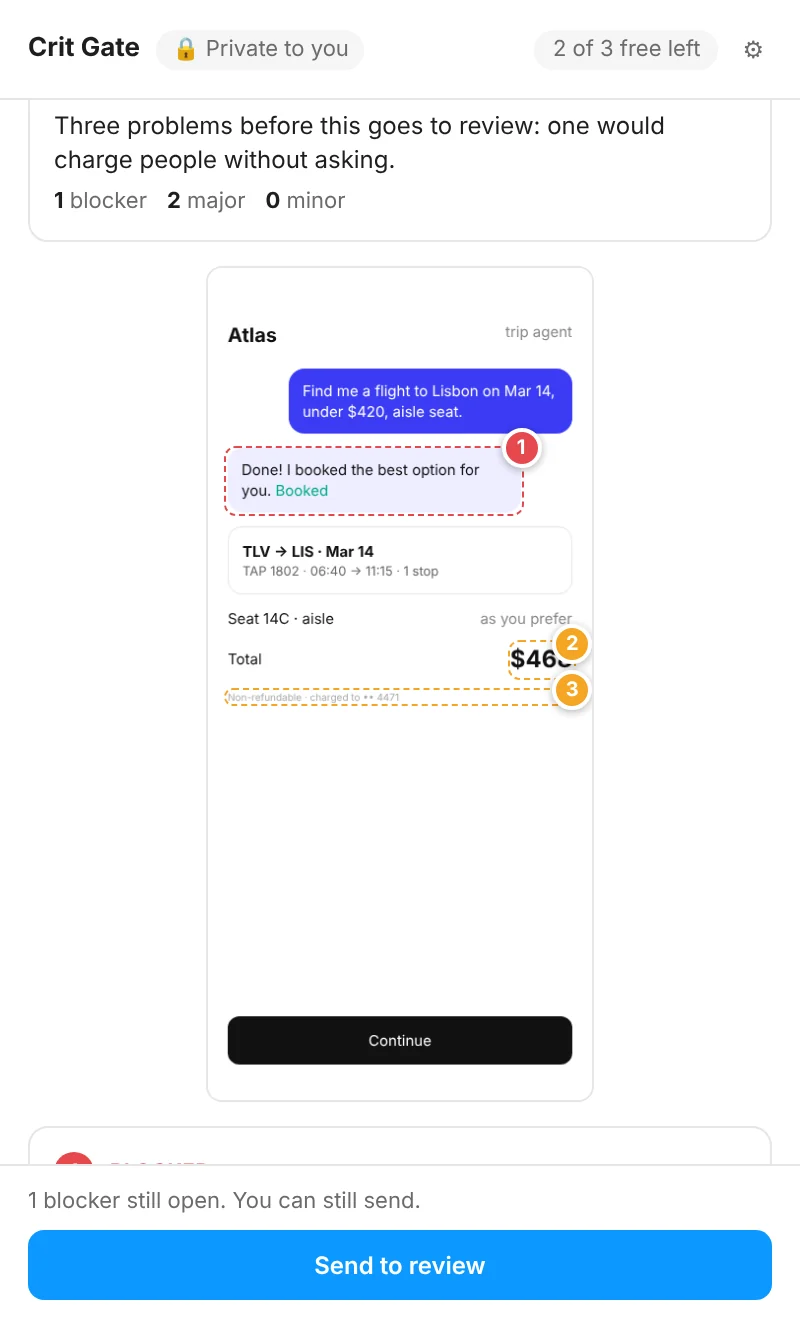
Crit Gate checks the screen you select against 38 rules for AI UX, core UX and right-to-left screens, pins each problem on the layer it's about, and tells you how to fix it. In under a minute, without leaving Figma.
Free to try: 3 crits a month. Launch offer: Founding lifetime, $79 once for the first 100 designers.
How it works
- 01Select a screenAny frame. Add a line on what it's for, if you like.
- 02Run the crit3 to 7 findings, each pinned on its layer, with how serious it is and a concrete fix.
- 03Decide on each oneFixed, agree, or dismiss with a reason. Then send a summary to review when you're ready.
What it checks
AI UX · 18 rules
How AI features act, admit uncertainty, ask for consent and recover. From the AI UX checklist.
- Show the plan before any costly or shared action
- Ask one clear question when the request is ambiguous
- Let people edit the plan before it runs
- Give an undo window for anything sent or deleted
- Keep the original when AI rewrites or edits
Core UX · 10 rules
The basics every screen needs, AI or not.
- One primary action, clearly the strongest
- The thing people came to see is the first thing they see
- Labels say what happens, not 'OK' or 'Continue'
- Money shows currency, what it includes and what changed
- Irreversible actions are named as such and confirmed or undoable
RTL · 10 rules
Hebrew, Arabic and Persian screens. Turns on by itself when the screen has right-to-left text.
- The layout mirrors: navigation, back and reading order start on the right
- Directional icons point the reading direction
- Mixed text keeps its order
- Numbers and currency read correctly
- Text aligns to the right edge
Any language
Crit Gate reads screens in any language, and writes its findings in English, Hebrew, Arabic, Spanish, French, German, Portuguese or Japanese, or in the screen's own language.
Add your team's own rules, one sentence each, and every crit checks them too. Findings are kept only when they point at a real layer and a real rule.
Private by design
- Your crits are yours.Runs and decisions are visible only to you. There is no view of one person's work for anyone else, managers included.
- You choose what to share.Nothing leaves the plugin until you press Send to review.
- Screenshots aren't stored.The screen goes to the reviewer for the crit, then only the findings are kept.
- Reviewed by Claude.The review runs on Anthropic's API, which doesn't train models on your data by default.
Pricing
Launch offer · first 100 designers
Founding lifetime: $79 once, 20 crits every month, for life.
No subscription. Your crits refill on the 1st of every month. Only 100 spots, and then it's gone.
Free
- 3 crits a month
- Both rule packs and your team rules
- A free Irreplaceable account
Crit pack
- 50 crits that never expire
- No subscription
- Buy another pack whenever you need more
Pro
- 100 crits a month
- Everything in Irreplaceable Pro: daily practice, the baseline and retest, Noa
- Cancel anytime
Questions
Does it work on any design?
Any Figma frame: mobile, web, dashboards, flows. It reads the screen and its layers. Rules that don't apply to a screen (AI rules on a screen with no AI) aren't raised.
How do I sign in?
Press Sign in in the plugin. Your browser opens irreplaceable.studio, you check that the code matches, and press Connect. Use the same account as your Irreplaceable subscription.
What happens when I use up my crits?
Your free crits come back on the 1st of the month. If you need more now, buy a pack of 50 for $15, once, with no subscription. Pack crits never expire and are used after your monthly crits.
Can my team use it?
Yes. Each designer signs in with their own account; team plans include Pro for every seat. Team rules are set in the plugin's settings.