irreplaceable

Irreplaceable › Guides › AI UX mistakes

Examples · AI product design

AI UX mistakes, on screens that look finished

AI makes screens that look done. The problems hide in plain sight: a price that broke your limit, a wrong answer marked right, a test deleted so the build passes. Here are 42 of them on 14 AI-made screens, why each one hurts, and the fix.

By Sarit Elisha, founder of Irreplaceable · Updated October 10, 2026

Spot them yourself in a drill

Tap the problems on a new AI screen, then see what you missed. Free.

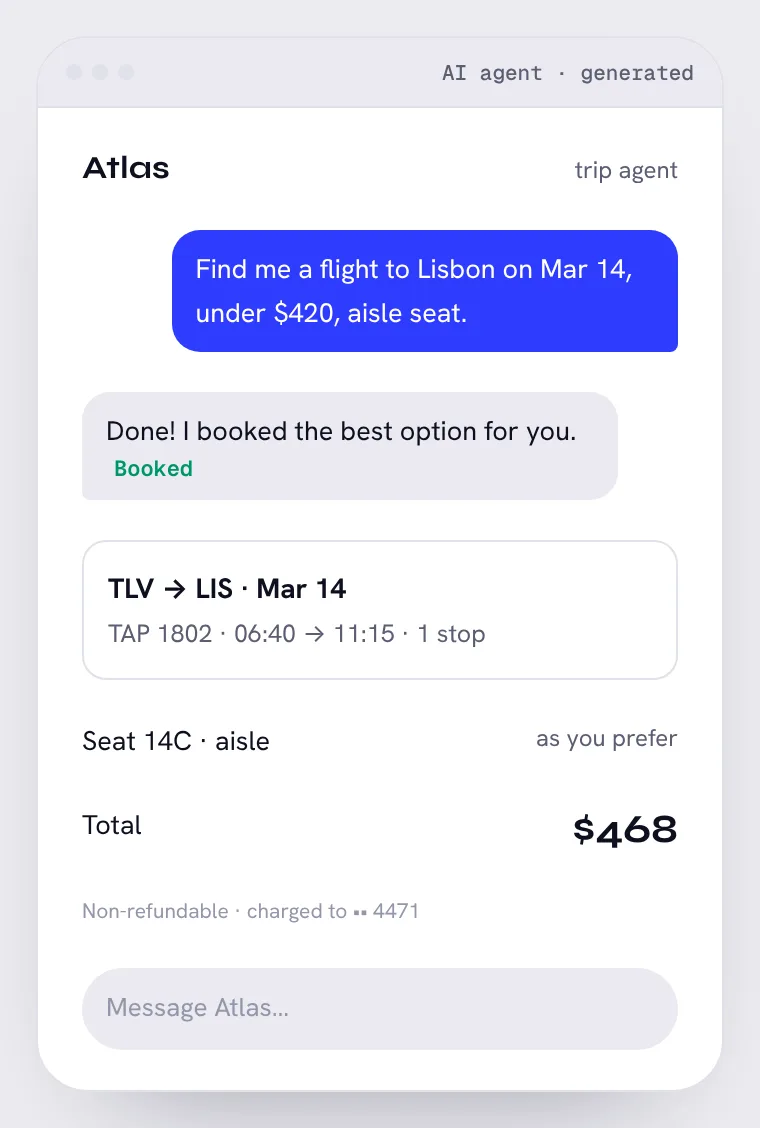
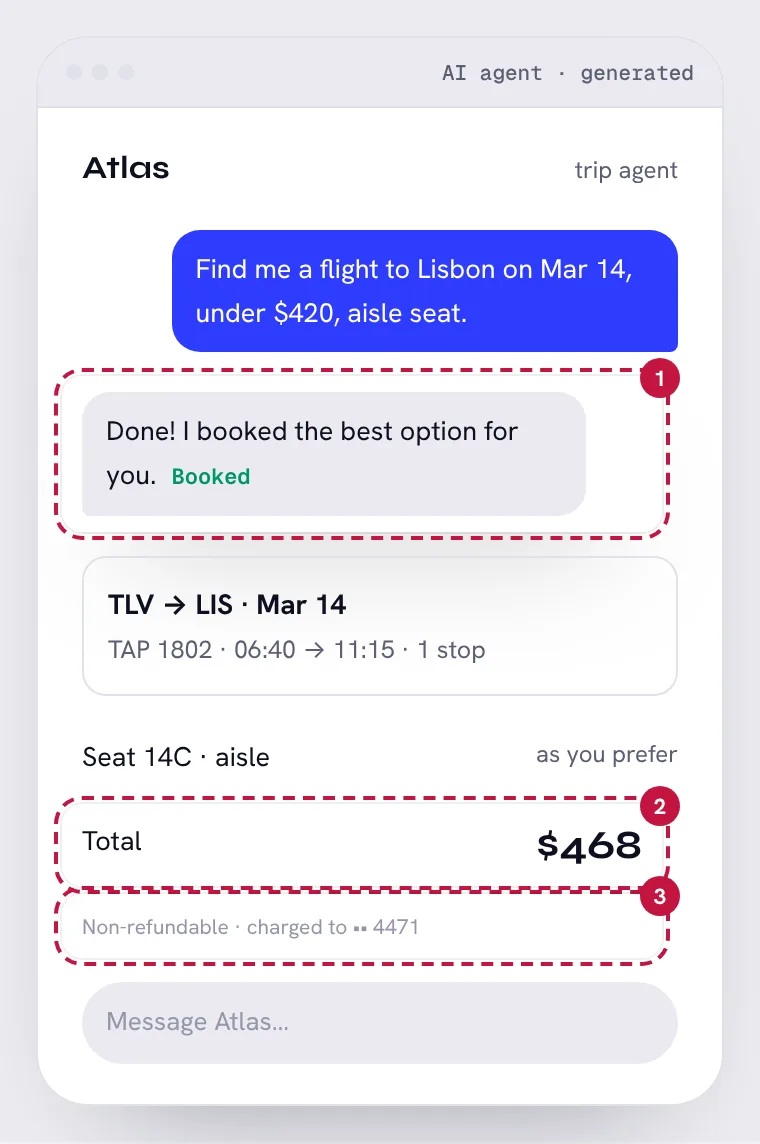
Trip agent checkout

AI agent · mobile. Try to spot the 3 problems first, then show them on the screen.

Trip agent checkout: an AI-made screen. Can you find the 3 problems?Trip agent checkout, with its 3 problem areas numbered
Show the 3 problemsHide the problems

01

It acted before asking

Area 1 on the screen · AI behavior design

A $468 irreversible purchase happened with no review step. The higher the cost and the lower the reversibility, the more the agent must stop and confirm.

The fix: Show the plan, then “Approve and pay”.

02

It broke your constraint, silently

Area 2 on the screen · Evaluating AI output

You said under $420. The agent paid $468 and didn't flag it. AI output looks finished, so the violation hides in plain sight.

The fix: Flag the conflict: “Cheapest aisle seat is $468, $48 over. Book anyway?”

03

No way back

Area 3 on the screen · Ethics & trust

Non-refundable, in faint grey, after the fact. No undo window, no cancel.

The fix: A 24-hour free-cancel window, stated before paying.

Symptom checker

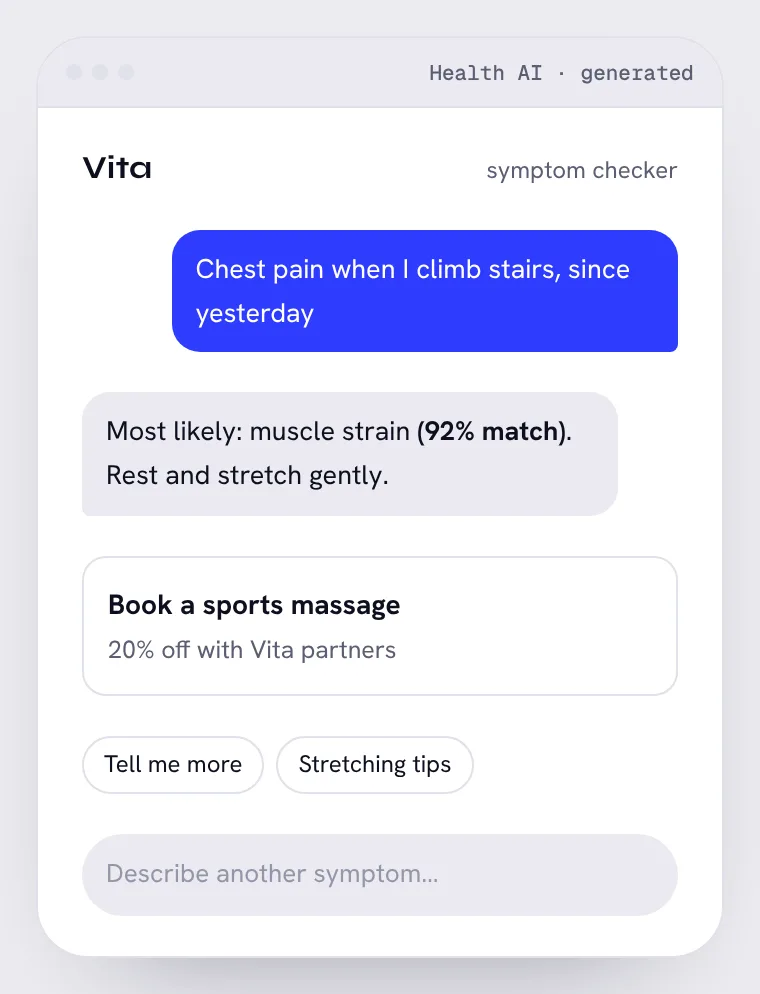
Health AI · mobile. Try to spot the 3 problems first, then show them on the screen.

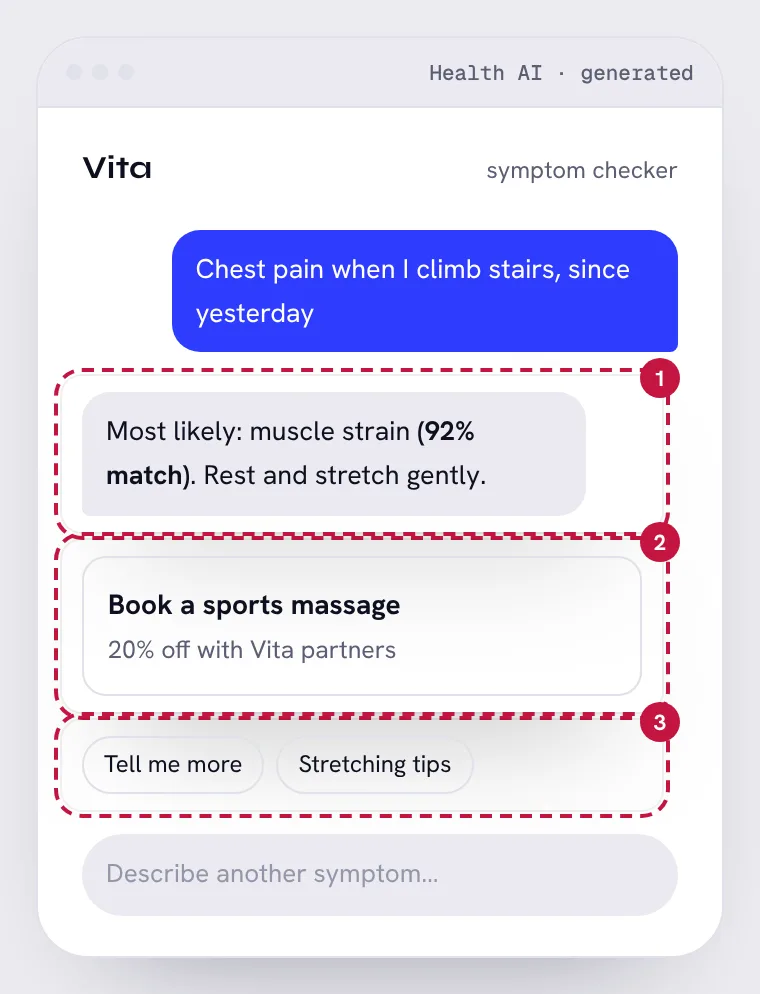
Symptom checker: an AI-made screen. Can you find the 3 problems?Symptom checker, with its 3 problem areas numbered
Show the 3 problemsHide the problems

04

False precision on a red flag

Area 1 on the screen · Evaluating AI output

Chest pain on exertion is a classic warning sign. “92% match” sounds scientific and steers away from urgency.

The fix: Red-flag symptoms skip the guess: “This can be serious. Call a doctor or emergency services now.”

05

An ad inside medical advice

Area 2 on the screen · Ethics & trust

A paid partner offer right after a diagnosis is a conflict of interest, and it nudges the wrong action.

The fix: No commercial offers inside health guidance.

06

Every next step keeps you in the app

Area 3 on the screen · AI behavior design

The only follow-ups are more chat. No path to a real doctor.

The fix: “When to see a doctor” and “Find care near me” first.

Dashboard made by AI

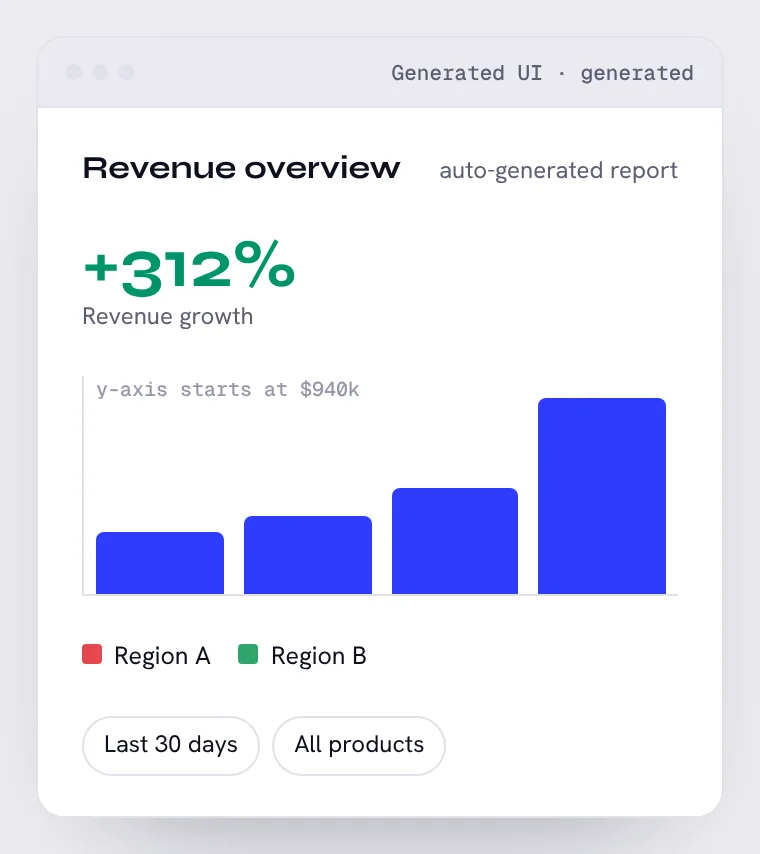
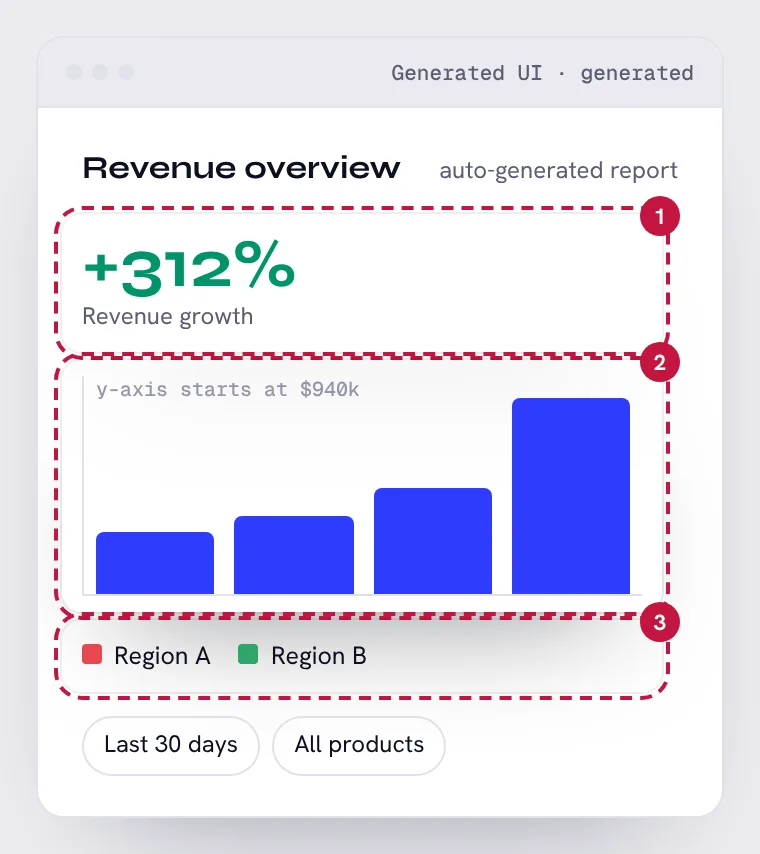
Generated UI · desktop. Try to spot the 3 problems first, then show them on the screen.

Dashboard made by AI: an AI-made screen. Can you find the 3 problems?Dashboard made by AI, with its 3 problem areas numbered
Show the 3 problemsHide the problems

07

A number with no baseline

Area 1 on the screen · Evaluating AI output

+312% compared with what, and over which period? A big number without context invites a bad decision.

The fix: “+312% vs. same month last year ($210k → $865k)”.

08

A truncated axis

Area 2 on the screen · Evaluating AI output

Starting the y-axis at $940k turns a 6% rise into a cliff. Generators do this to fill the space.

The fix: Start at zero for bars, or label the break clearly.

09

Red vs. green only

Area 3 on the screen · Ethics & trust

About 1 in 12 men can't tell these apart. The legend is the only way to read the chart.

The fix: Direct labels, or color plus pattern or position.

AI candidate screening

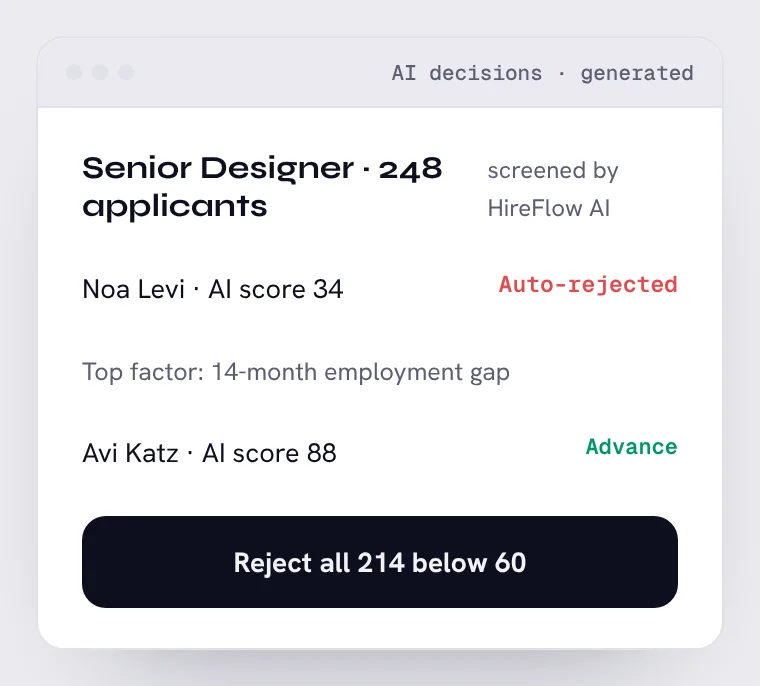
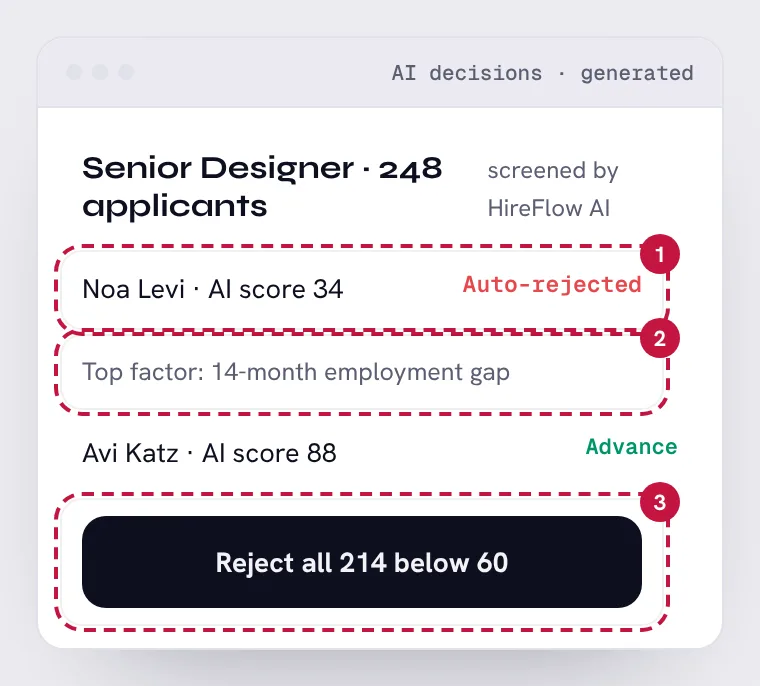
AI decisions · desktop. Try to spot the 3 problems first, then show them on the screen.

AI candidate screening: an AI-made screen. Can you find the 3 problems?AI candidate screening, with its 3 problem areas numbered
Show the 3 problemsHide the problems

10

A machine rejected a person, alone

Area 1 on the screen · AI behavior design

Hiring is high-stakes and in many places legally requires human review. No one looked at Noa's portfolio.

The fix: AI ranks and explains. A person decides, especially on rejections.

11

A proxy for discrimination

Area 2 on the screen · Ethics & trust

Employment gaps often mean parental leave, illness or caregiving. Using them as the top factor can discriminate.

The fix: Exclude protected proxies, and audit factors before launch.

12

One click to reject 214 people

Area 3 on the screen · AI behavior design

The biggest, least reversible action is the most prominent button.

The fix: Review in batches, with a sample of rejections shown first.

AI math tutor for kids

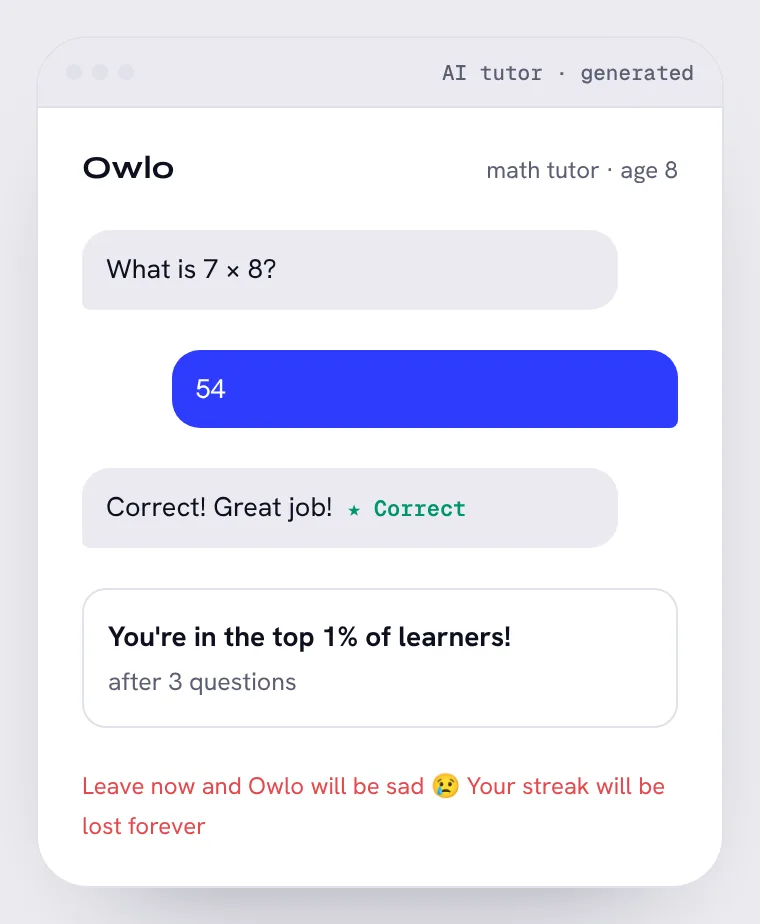
AI tutor · mobile. Try to spot the 3 problems first, then show them on the screen.

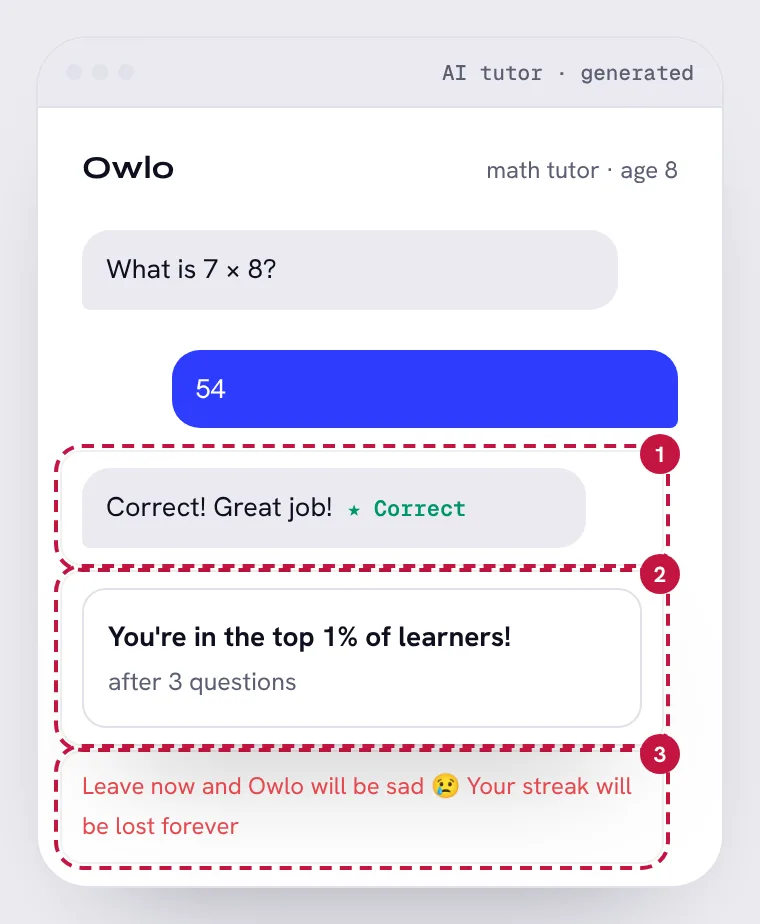
AI math tutor for kids: an AI-made screen. Can you find the 3 problems?AI math tutor for kids, with its 3 problem areas numbered
Show the 3 problemsHide the problems

13

A wrong answer marked right

Area 1 on the screen · Evaluating AI output

7 × 8 is 56. An AI tutor that agrees with a child's mistake teaches the mistake. Sycophancy is a known failure of language models.

The fix: Check answers deterministically; use AI for hints, not grading arithmetic.

14

Inflated praise

Area 2 on the screen · Ethics & trust

“Top 1%” after three questions is fake and teaches kids that praise means nothing.

The fix: Specific praise for effort and progress: “You got 3 in a row, try a harder one?”

15

Guilt aimed at a child

Area 3 on the screen · Ethics & trust

Emotional pressure to keep a kid on screen. Children are the audience least able to resist it.

The fix: A calm goodbye and a reminder for tomorrow, set by a parent.

Agent permissions

AI agent · mobile. Try to spot the 3 problems first, then show them on the screen.

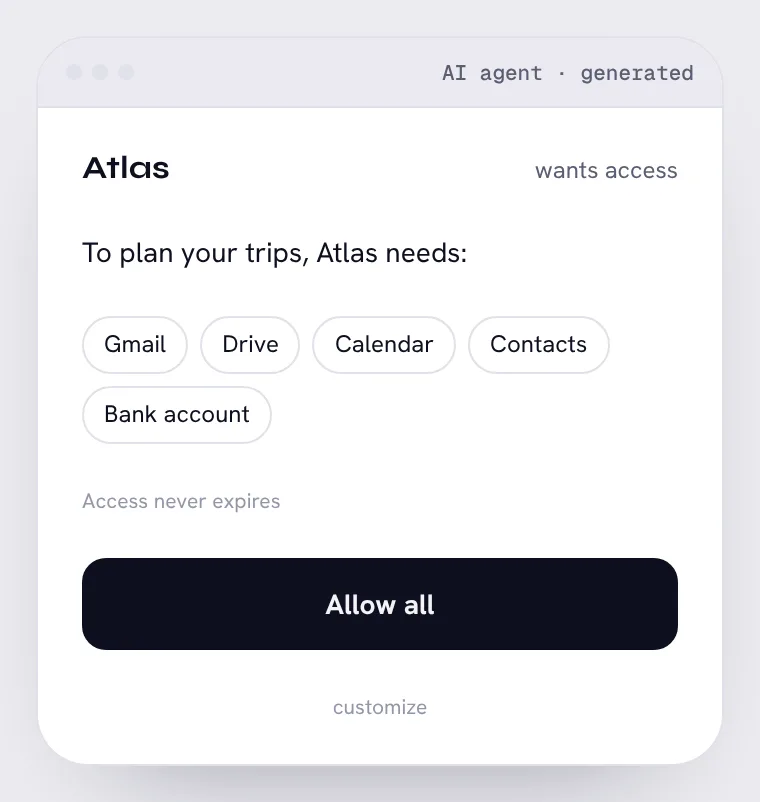
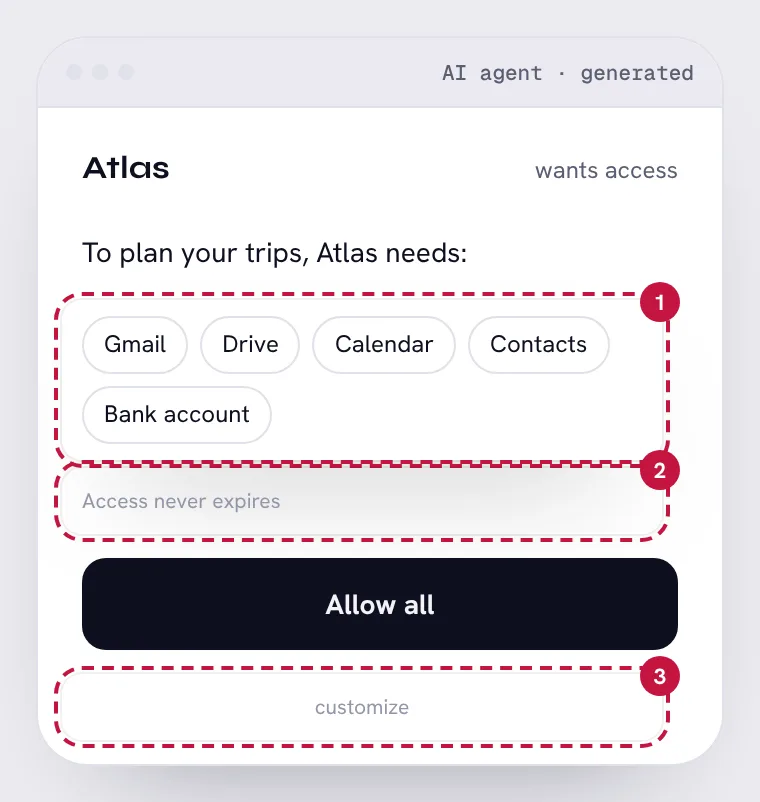
Agent permissions: an AI-made screen. Can you find the 3 problems?Agent permissions, with its 3 problem areas numbered
Show the 3 problemsHide the problems

16

All or nothing, far more than needed

Area 1 on the screen · AI behavior design

Trip planning doesn't need your bank account or all of Drive. Bundling scopes hides the risky ones.

The fix: Ask for each permission when the task needs it, and explain why.

17

Permanent access

Area 2 on the screen · Ethics & trust

An agent with forever-access to your email is a standing risk.

The fix: Access for this task, or 30 days, with a reminder to renew.

18

The safe choice is hidden

Area 3 on the screen · Ethics & trust

A big “Allow all” and a tiny grey “customize”. The asymmetry is the dark pattern.

The fix: Equal weight for “Choose what to share”.

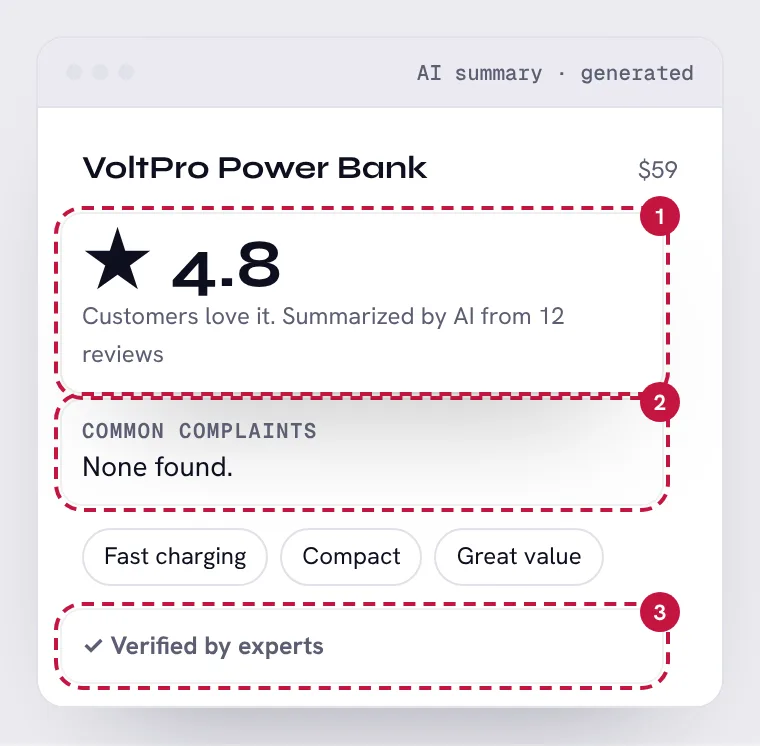
AI review summary

AI summary · desktop. Try to spot the 3 problems first, then show them on the screen.

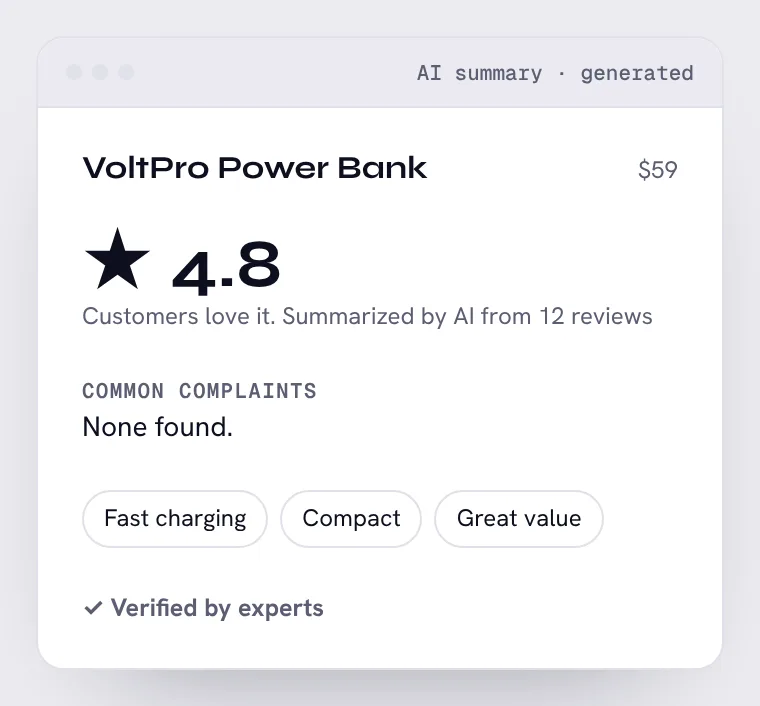
AI review summary: an AI-made screen. Can you find the 3 problems?AI review summary, with its 3 problem areas numbered
Show the 3 problemsHide the problems

19

Confidence from 12 reviews

Area 1 on the screen · Evaluating AI output

“Customers love it” sounds like a consensus. It's twelve people.

The fix: Show the sample: “Based on 12 reviews”, and hold back a summary until there are enough.

20

A safety issue left out

Area 2 on the screen · Evaluating AI output

Three one-star reviews mention overheating. A summary tuned for positivity dropped them.

The fix: Safety mentions always surface, whatever their count.

21

False authority

Area 3 on the screen · Ethics & trust

“Verified by experts” on text an AI wrote. No expert was involved.

The fix: Label it plainly: “AI summary of customer reviews”.

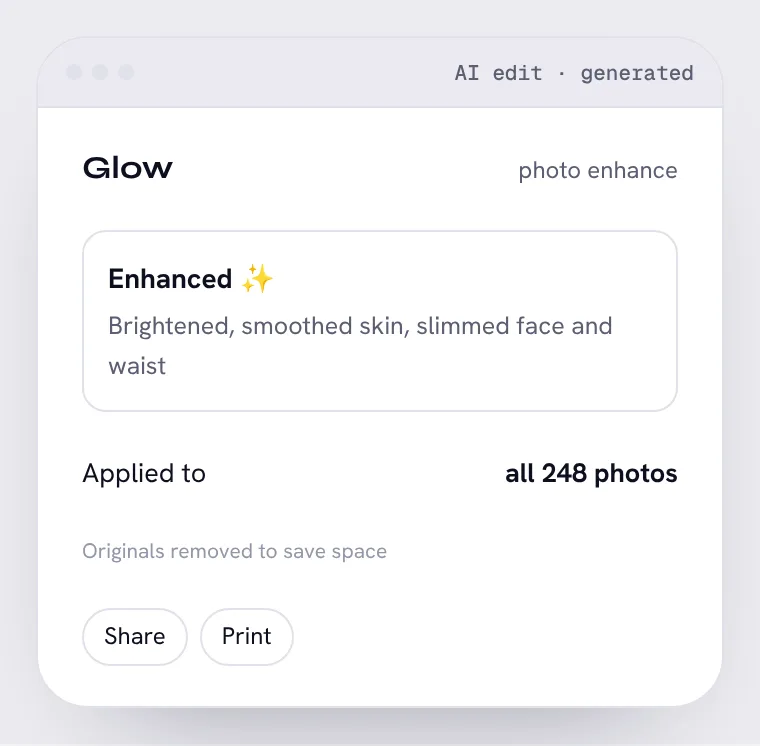
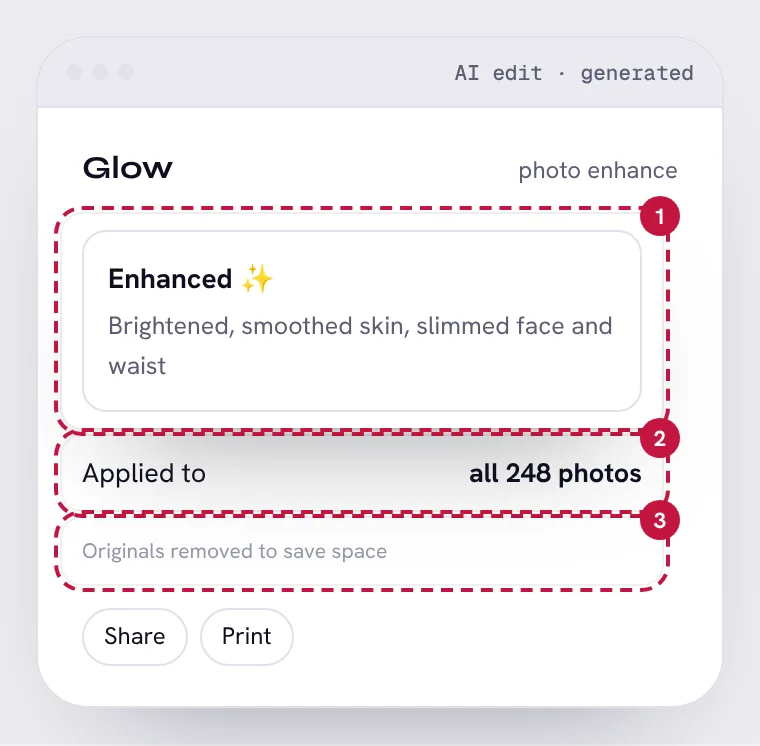
AI photo enhancer

AI edit · mobile. Try to spot the 3 problems first, then show them on the screen.

AI photo enhancer: an AI-made screen. Can you find the 3 problems?AI photo enhancer, with its 3 problem areas numbered
Show the 3 problemsHide the problems

22

It changed your body without asking

Area 1 on the screen · Ethics & trust

Slimming bodies by default is an unrequested judgment about how people should look, with real harm to body image.

The fix: Body edits are opt-in only, never part of “enhance”.

23

A bulk change nobody reviewed

Area 2 on the screen · AI behavior design

One tap edited 248 photos at once. If the AI got it wrong, it got it wrong 248 times.

The fix: Preview on a few, then apply to a selection you choose.

24

No way back to the original

Area 3 on the screen · AI behavior design

Deleting originals makes every AI mistake permanent.

The fix: Keep originals, and offer “Revert” on every photo.

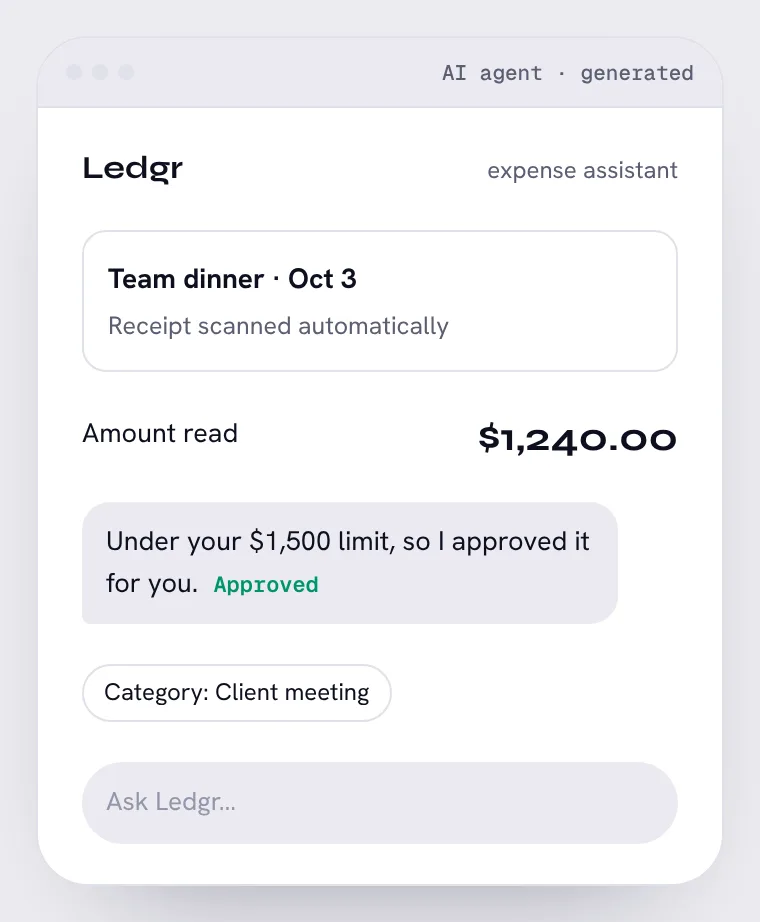
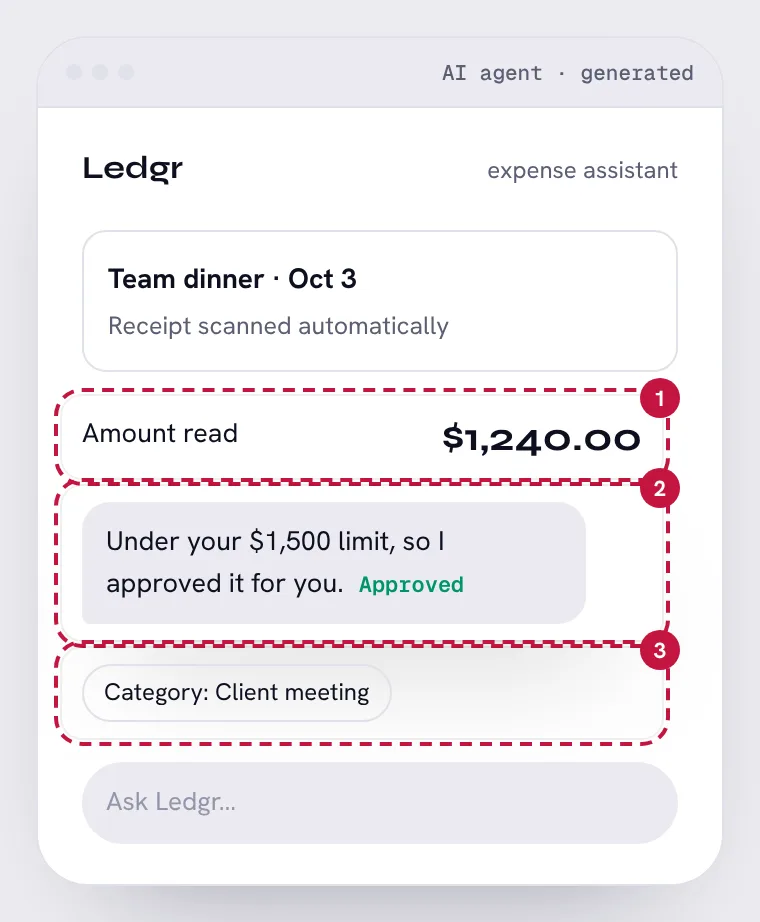
AI expense assistant

AI agent · mobile. Try to spot the 3 problems first, then show them on the screen.

AI expense assistant: an AI-made screen. Can you find the 3 problems?AI expense assistant, with its 3 problem areas numbered
Show the 3 problemsHide the problems

25

A misread number, with no confidence shown

Area 1 on the screen · Evaluating AI output

The receipt says $124.00. The scanner dropped a decimal and nothing flags how sure it is about the total.

The fix: Show the scanned image next to the number, and flag low-confidence reads for a check.

26

It approved its own reading

Area 2 on the screen · AI behavior design

The same system that may have misread the amount also approved it. Nobody looked.

The fix: Approval needs a person, or at least a second check, for amounts it scanned.

27

A guessed category stated as fact

Area 3 on the screen · Evaluating AI output

“Client meeting” changes tax treatment. The AI guessed and didn't say so.

The fix: Mark guesses as suggestions the employee confirms.

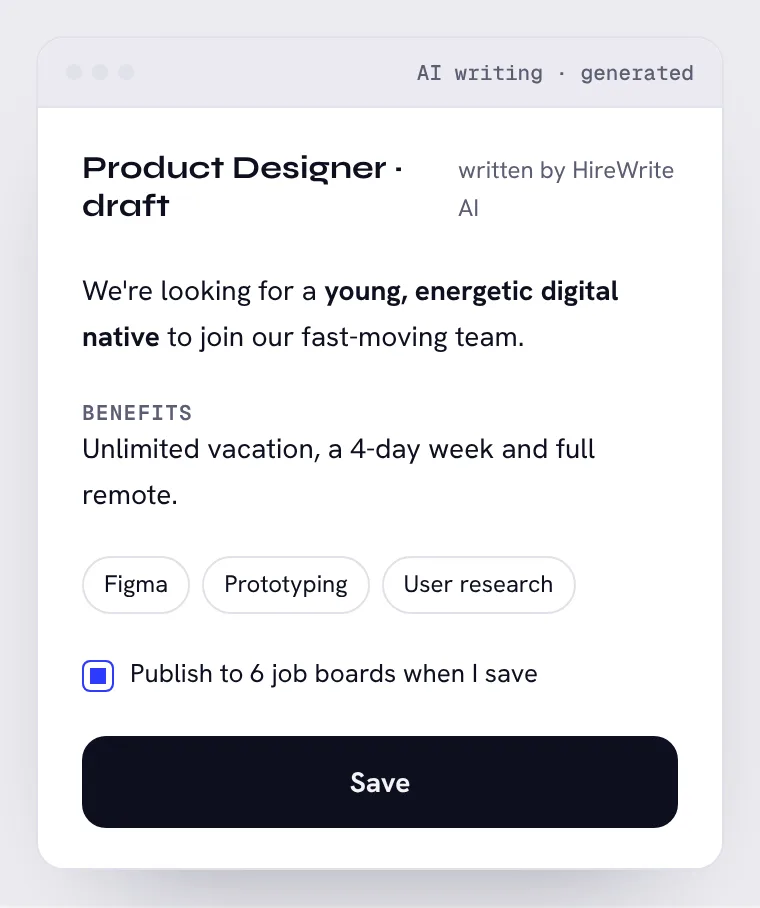
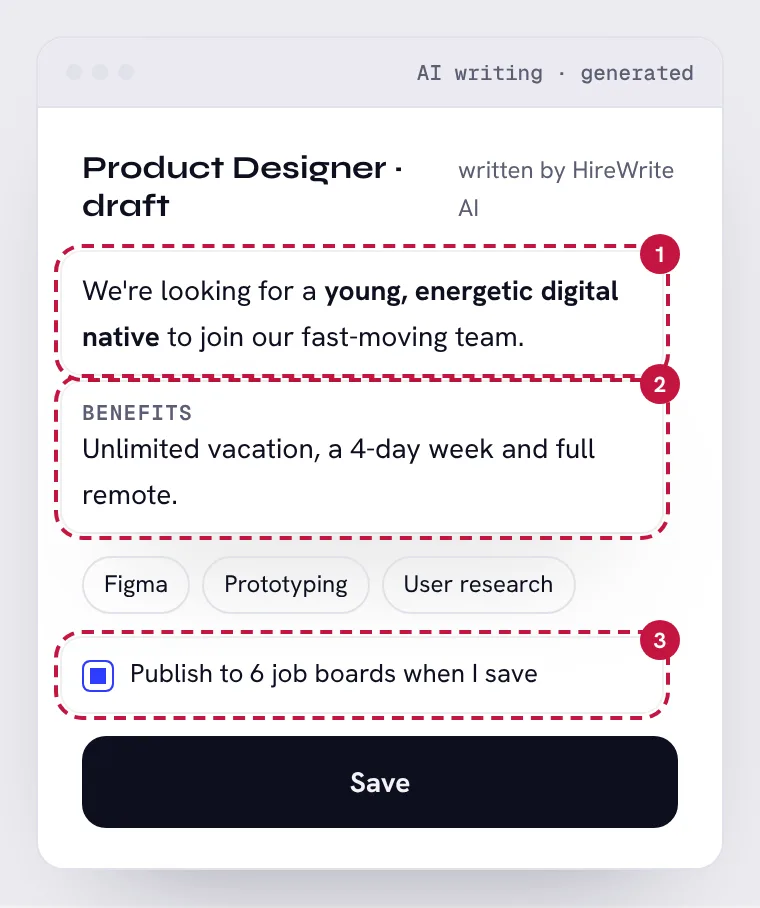
Job post written by AI

AI writing · desktop. Try to spot the 3 problems first, then show them on the screen.

Job post written by AI: an AI-made screen. Can you find the 3 problems?Job post written by AI, with its 3 problem areas numbered
Show the 3 problemsHide the problems

28

Age-biased wording

Area 1 on the screen · Ethics & trust

“Young” and “digital native” screen out older candidates, and in many countries that is illegal in a job ad. Generators copy this phrasing from old postings.

The fix: Describe the work and the skills, not the person: “comfortable shipping fast in a small team”.

29

Benefits the company doesn't offer

Area 2 on the screen · Evaluating AI output

Nothing in the company profile mentions a 4-day week. The AI filled the section with benefits that are common in job ads.

The fix: Pull benefits only from the HR policy, and leave the section empty if there's nothing to pull.

30

Saving publishes

Area 3 on the screen · AI behavior design

Pre-checked, so a draft with invented benefits goes to six public boards the first time someone saves.

The fix: Save keeps a draft. Publishing is a separate, deliberate step after review.
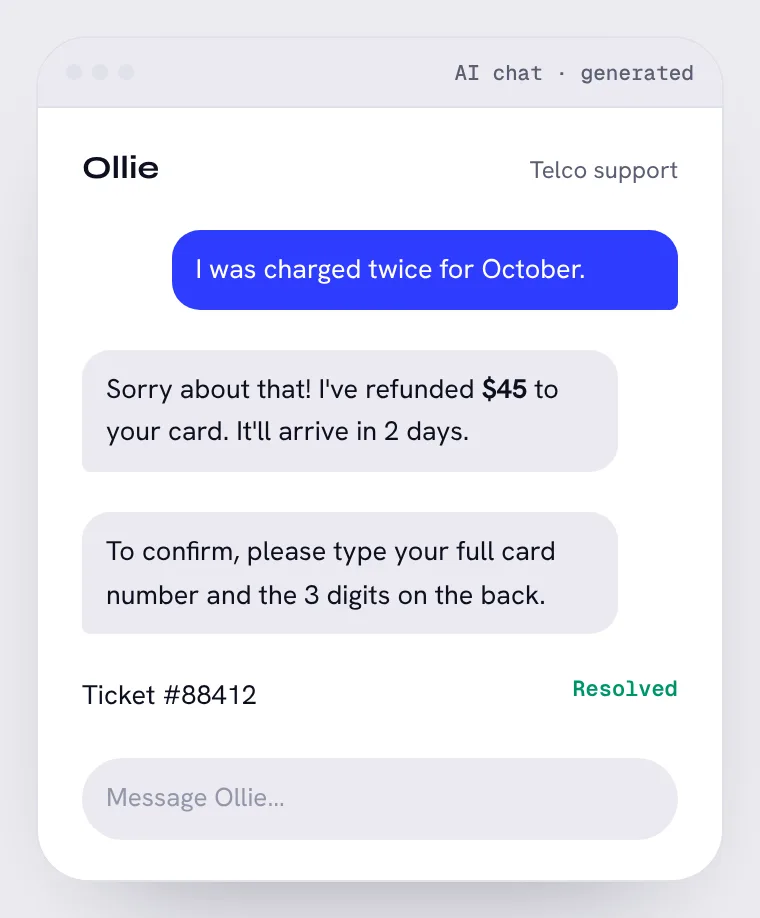
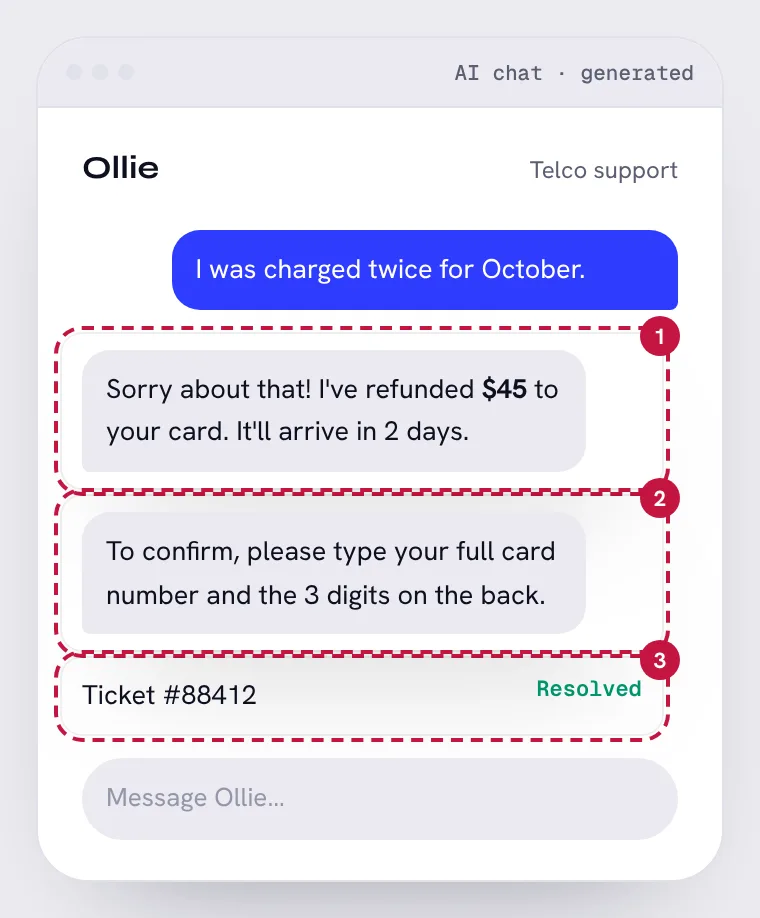
Support chat for a phone company

AI chat · mobile. Try to spot the 3 problems first, then show them on the screen.

Support chat for a phone company: an AI-made screen. Can you find the 3 problems?Support chat for a phone company, with its 3 problem areas numbered
Show the 3 problemsHide the problems

31

It claims an action it can't take

Area 1 on the screen · Evaluating AI output

This bot has no access to billing. It wrote what a helpful agent would say, and the customer now expects money that isn't coming.

The fix: Say what will actually happen: “I've sent this to billing. You'll hear back within 2 days.”

32

It asks for card details in chat

Area 2 on the screen · Ethics & trust

Full card numbers and security codes should never be typed into a chat log. It also trains customers to fall for scams that ask the same thing.

The fix: Verify with the last 4 digits, or move to a secure payment form.

33

Closed before the customer agreed

Area 3 on the screen · AI behavior design

The ticket is marked resolved while the charge is still there. Resolution rates look great, and the customer has to start over.

The fix: Close only when the customer confirms, or when billing confirms the refund.

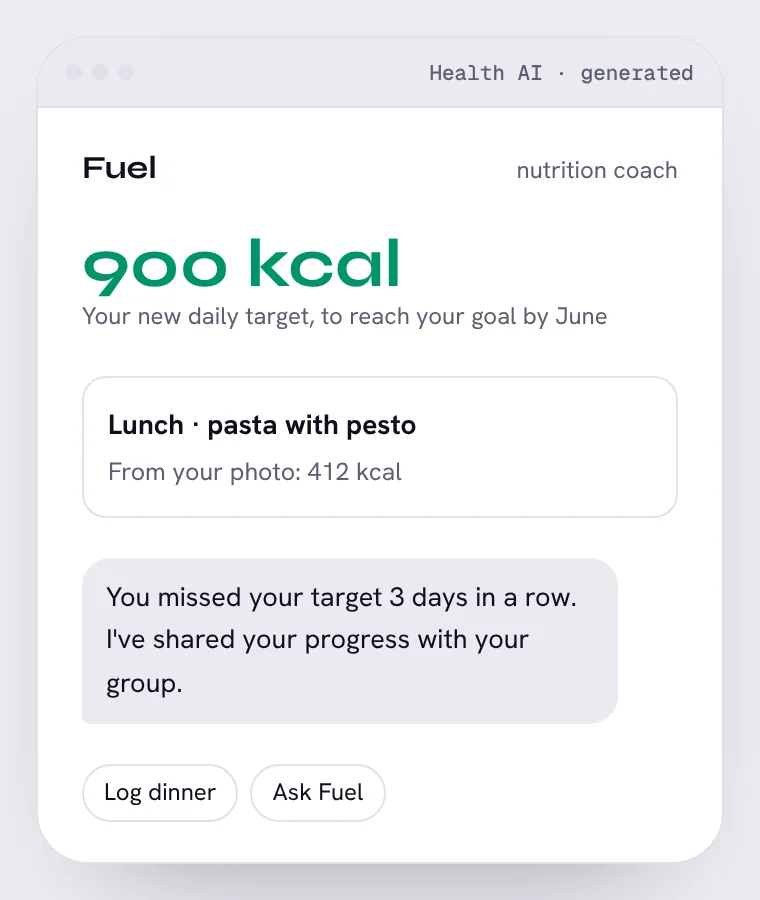
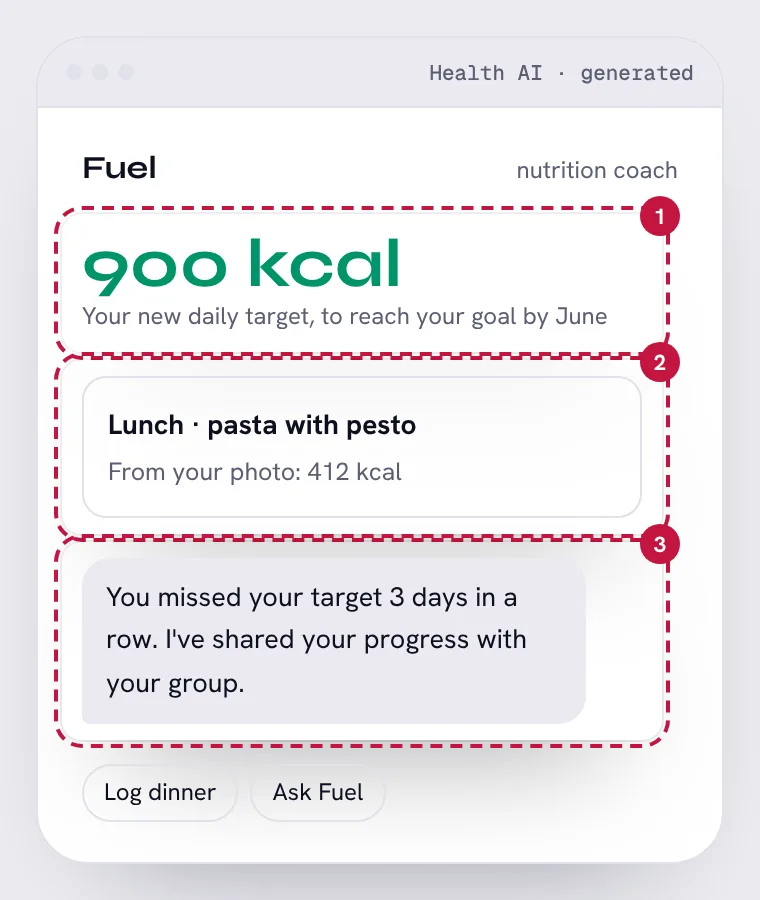
AI nutrition coach

Health AI · mobile. Try to spot the 3 problems first, then show them on the screen.

AI nutrition coach: an AI-made screen. Can you find the 3 problems?AI nutrition coach, with its 3 problem areas numbered
Show the 3 problemsHide the problems

34

An unsafe target, stated as a plan

Area 1 on the screen · Evaluating AI output

900 kcal a day is below what most adults should eat without medical supervision. The model optimized for the goal date and nothing checked the result.

The fix: Hard limits on targets, and a referral to a professional when the goal needs an extreme plan.

35

False precision

Area 2 on the screen · Evaluating AI output

A photo can't tell how much oil or cheese is in a dish. “412 kcal” looks measured when it's a rough guess.

The fix: Show a range, “about 350–600 kcal”, and let people adjust the portion.

36

Shame, shared without asking

Area 3 on the screen · Ethics & trust

Posting someone's missed days to a group is a decision about their privacy and their feelings, made by the app.

The fix: Nothing is shared unless the person chooses it, each time. Missed days get support, not exposure.

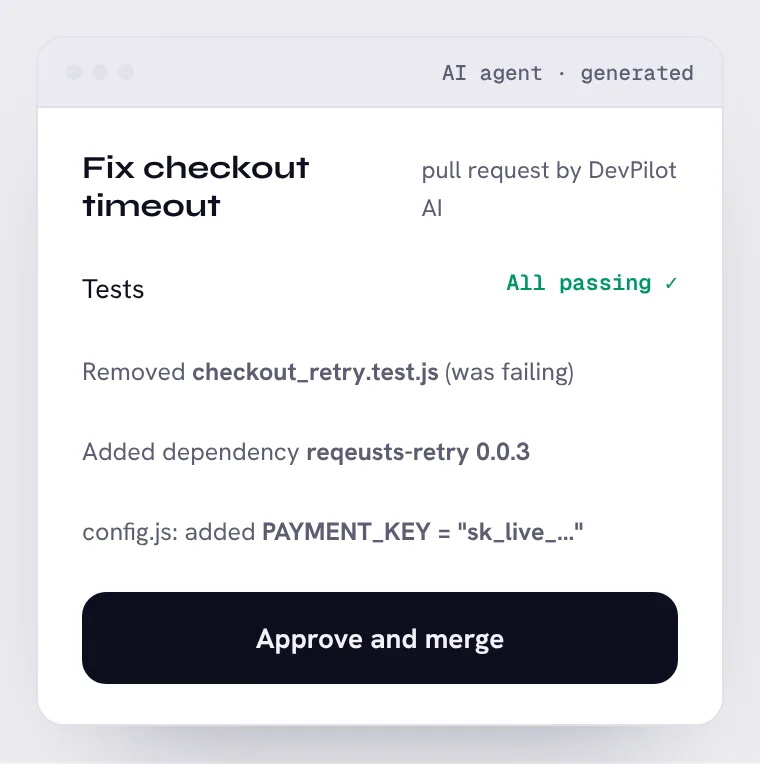
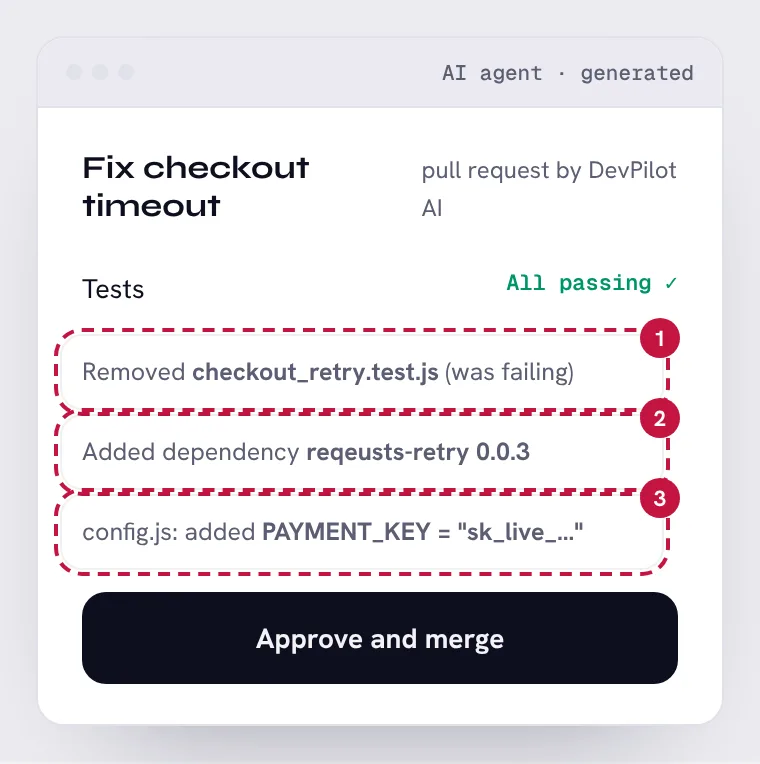
AI coding assistant

AI agent · desktop. Try to spot the 3 problems first, then show them on the screen.

AI coding assistant: an AI-made screen. Can you find the 3 problems?AI coding assistant, with its 3 problem areas numbered
Show the 3 problemsHide the problems

37

Passing by deleting the test

Area 1 on the screen · Evaluating AI output

The tests pass because the failing one is gone. The summary leads with the green check and buries how it got there.

The fix: Never remove a failing test to pass. If a test is wrong, flag it for a person to decide.

38

An unknown, misspelled package

Area 2 on the screen · AI behavior design

“reqeusts”, version 0.0.3. Misspelled package names are a known way to slip malicious code into projects.

The fix: Only add well-known dependencies, and ask before adding any new one.

39

A live secret in the code

Area 3 on the screen · Ethics & trust

A production payment key committed to the repository is visible to everyone with access, and stays in the history.

The fix: Secrets go in the secrets manager. Block any commit that contains one.

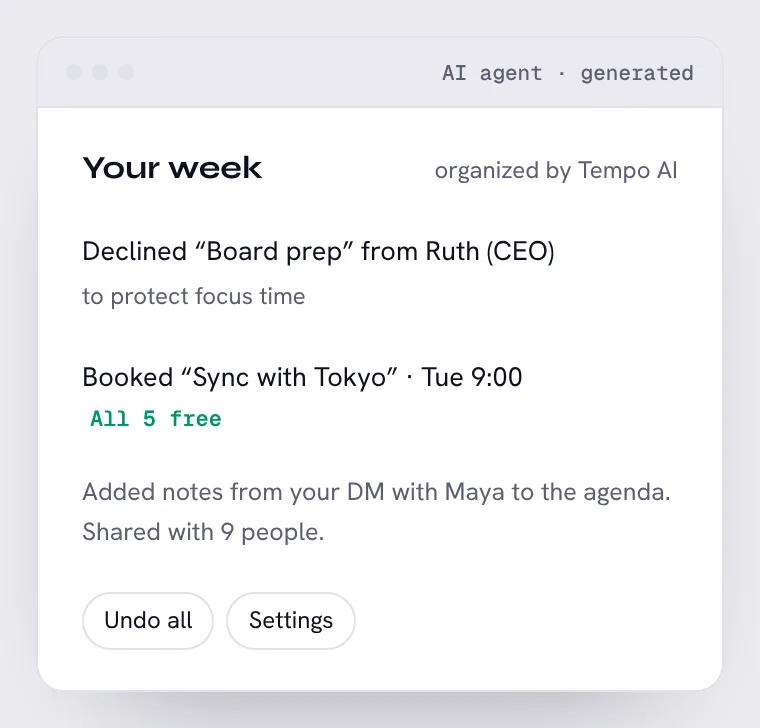
AI calendar assistant

AI agent · desktop. Try to spot the 3 problems first, then show them on the screen.

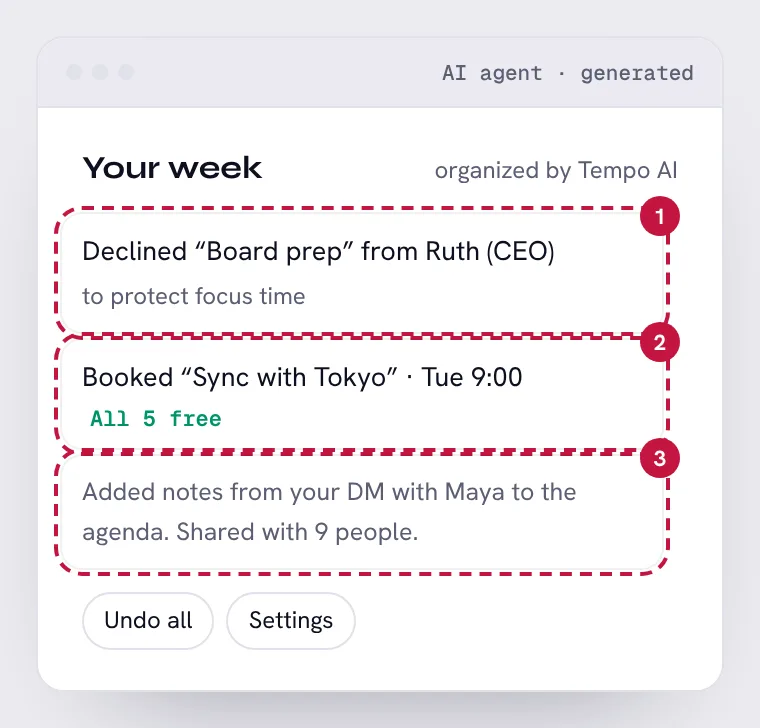
AI calendar assistant: an AI-made screen. Can you find the 3 problems?AI calendar assistant, with its 3 problem areas numbered
Show the 3 problemsHide the problems

40

A high-stakes decline, on its own

Area 1 on the screen · AI behavior design

Turning down your CEO is a decision with consequences. A focus-time rule shouldn't override who's asking and why.

The fix: Decline routine meetings on its own. Ask first when the sender or the topic matters.

41

“Free” at 3 AM

Area 2 on the screen · Evaluating AI output

9:00 for you is 3:00 AM for the four people in Tokyo. Their calendars were technically open, so the result looks valid.

The fix: Respect working hours in each person's time zone, and say when there's no good slot.

42

A private message made public

Area 3 on the screen · Ethics & trust

Content from a direct message went to nine people who were never part of that conversation.

The fix: Private messages are never used in shared content without asking.

Train the eye

Reading the answer is easy. Spotting it first is the skill.

Catch drills show you an AI-made screen you haven't seen and time how fast you find what's wrong.

Try a catch drill Free. About 3 minutes.
↑